100 Days of SwiftUI
2026-05-27
Project 7, part 3
iExpense wrap up and challenges
Quiz: 12/12
Challenge
- Use the user’s preferred currency, rather than always using US dollars.
This one required revisiting the WeSplit app .currency(code: Locale.current.currency?.identifier ?? "USD")
Remember to replace it in two places!
I wasn’t able to check this, though, because I couldn’t figure out how to change the region for the simulated phone. I could set it to, say, Germany .environment(\.locale, Locale(identifier: "de_DE")) but it would just change the decimal point to a comma and move the $ to the end. I expected €
- Modify the expense amounts in ContentView to contain some styling depending on their value – expenses under $10 should have one style, expenses under $100 another, and expenses over $100 a third style. What those styles are depend on you.
I solved this using a nested ternary. Maybe not the cleanest? but it was better than separate Text() views IMO.
Here is the code from the first two challenges together (not including the currency line in AddView)
Text(
    item.amount,
    format: .currency(
        code: Locale.current.currency?.identifier
            ?? "USD"
    )
)
.foregroundStyle(
    item.amount > 100.0
        ? .red
        : (item.amount < 10.0 ? .secondary : .primary)
)
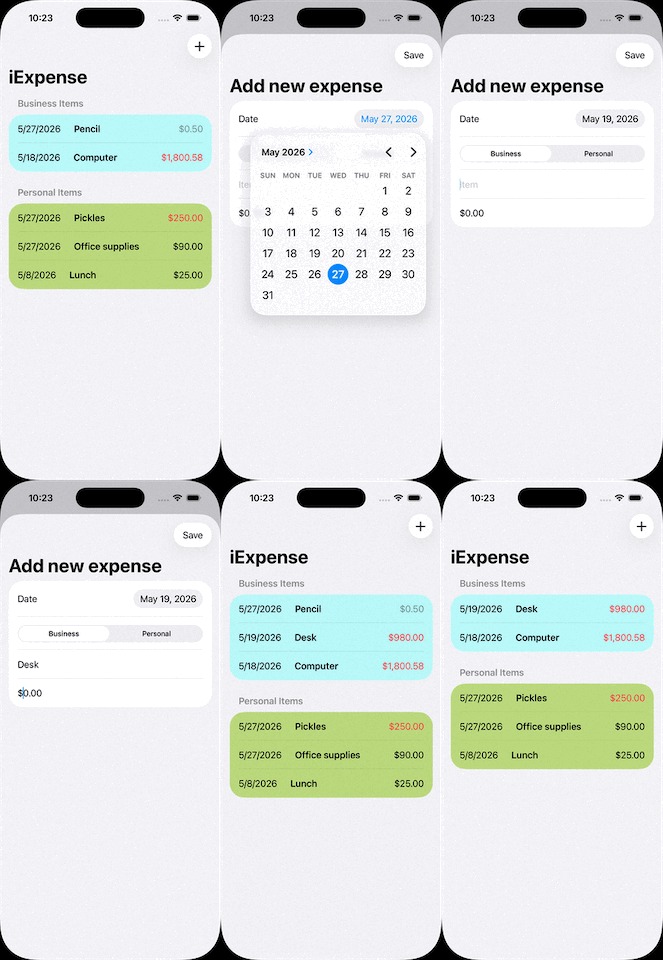
- For a bigger challenge, try splitting the expenses list into two sections: one for personal expenses, and one for business expenses. This is tricky for a few reasons, not least because it means being careful about how items are deleted!
So yesterday I did add the date to the expense record. Then I made a little ternary operator to color the row depending on it’s type (business or personal). Here’s what that looks like (it’s attached to the HStack)
.listRowBackground(
    item.type == "Business"
    ? Color(red: 0.5, green: 1, blue: 1, opacity: 0.5)
    : Color(red: 0.5, green: 0.75, blue: 0, opacity: 0.5)
)
Then in my ForEach I sorted by date ascending expenses.items.sorted(by: {$0.date < $1.date})
This means I can see at a glance which expense items are personal and which are business. Not the challenge he suggested though, so let’s see if I can manage it.
Well one way is to sort the list on multiple values
ForEach(expenses.items.sorted(by: {($0.type, $1.date) < ($1.type, $0.date)})) This sorts by type first (Business or personal), then date descending. I tried putting amount in the sort, but I think the date object includes time so… 🤷♀️
OK, I did it, but there’s a bit of duplication that I don’t like. Basically I filter the list twice, and show each list in its own section. I should create an “expense details” view someday, but today is not that day.