100 Days of SwiftUI
2026-06-29
Project 11, part 4
Bookworm Wrap up
Quiz: 9/12 guess I haven’t internalized all the things
Sometimes you have to go back to the original… 
Challenge
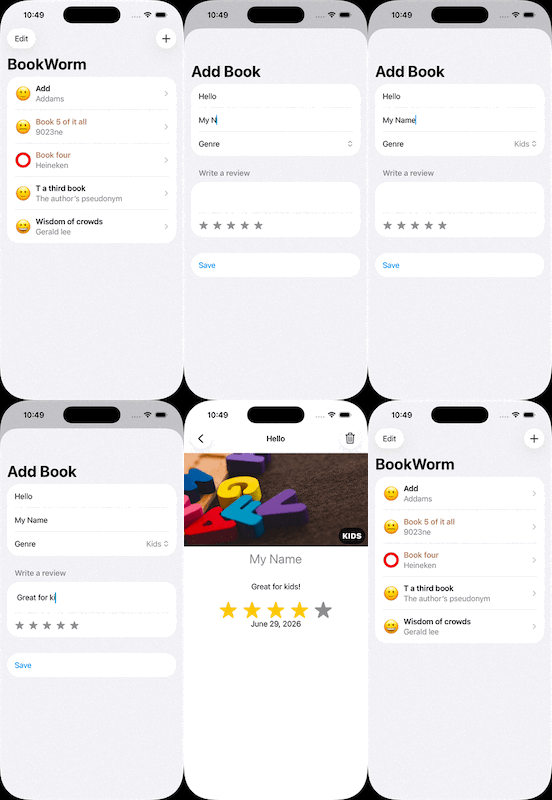
- Right now it’s possible to select no title, author, or genre for books, which causes a problem for the detail view. Please fix this, either by forcing defaults, validating the form, or showing a default picture for unknown genres – you can choose.
First, I added a default “unknown genre” picture — a bookcase by Rocco Stoppoloni at Unsplash.
Then, I added disabled the “Save” button on the AddBookView if the title or author is empty (trimming whitespaceand).trimmingCharacters(in: .whitespacesAndNewlines).isEmpty. While there I set the rating to be an emptyInt()`
Next, I went to the DetailView and added the default image as a computed property
let book: Book
var coverImage: Image {
    if book.genre.isEmpty {
        return Image("Unknown")
    } else {
        return Image(book.genre)
    }
}return even if it’s only 1 lineI specifically didn’t update the Genre label in DetailView
- Modify ContentView so that books rated as 1 star are highlighted somehow, such as having their name shown in red.
Since it is possible to not have a rating, I changed the EmojiRatingView default to be ⭕️ rather than 😁 — which is for 5 stars not 0 stars!
So now I need to get “unrated” and “1 star” decorated… here it is! .foregroundStyle(book.rating < 2 ? .brown : .primary) (I don’t like using red, so I chose brown)
- Add a new “date” attribute to the Book class, assigning Date.now to it so it gets the current date and time, then format that nicely somewhere in DetailView.
Adding the date to the model is very easy! Just 3 lines — the var and two places in the init
HOWEVER, I did get an error and the Simulator didn’t show me any titles in my data. The error is Validation error missing attribute values on mandatory destination attribute. According to SO, the way to fix it is to define a default date for the existing entries. Then I removed that default because I could.
Still waiting for editing tho…