Quartile Solver
2026-07-17
As I mentioned a few days ago, I made a Quartile Solver for myself. I can drag/drop a screencap of the token grid, or I can type them in, and it will come up with lists of words that can be made by the tokens.
Developing the valid word list is an ongoing project — the sources I’m using often don’t have modern portmanteaus or compound words for instance — so it doesn’t always find the complete solution.
It also offers words (primarily 1-token) that aren’t in Apple’s wordlist. So there’s a way to put them on a “reject” list so it stops suggesting them.
I started this project when I realized that I can go back to the beginning and complete all the puzzles I didn’t do! I still do the puzzle until I get really stuck (usually the last few 3-token words), and then I load the grid in Quartile Solver and work through it.
As for the Codex part… well it was interesting directing it. It took about 2 days off and on to get a working app, and another couple of weeks for refinements. If I was an expert in SwiftUI it could have been quicker, but if I was an expert I would not likely use AI for coding. Though who knows?
This screencap shows some of the things “we”’ve been working through
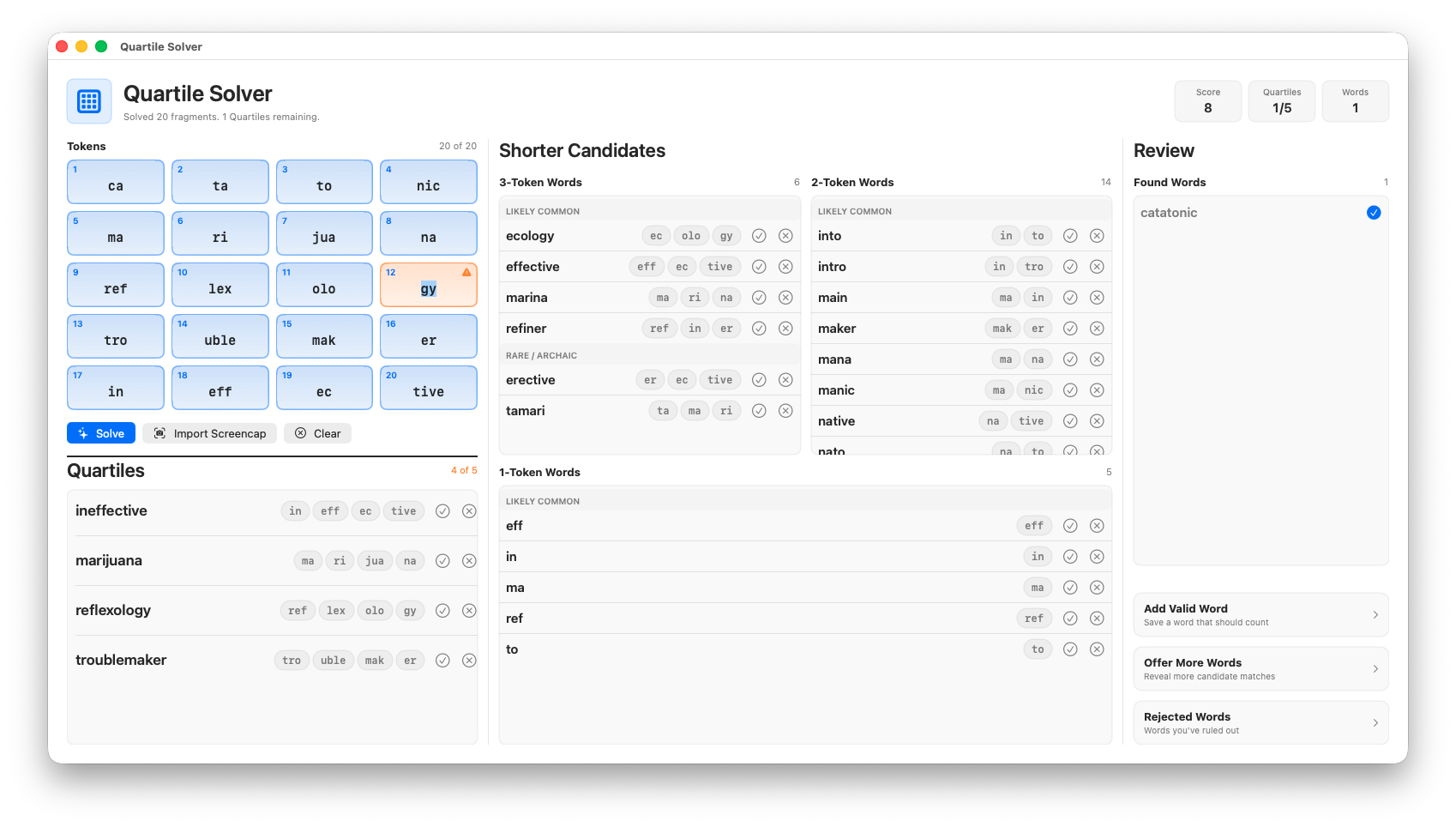
In the Token Grid one is flagged because the OCR had some sort of difficulty (it is really common for this “gy” token in particular). 4- 3- and 2-token candidates are presented with buttons to “accept” and “reject” the candidate. Rejected words go on a list for future games (stored in UserData), if there aren’t enough candidates you can ask for more — this isn’t as useful as I’d like, and you can review all of the found words in alphabetical order to check with the actual Quartiles game.
I’ve enjoyed making this and learning some of the nuances of working with an AI coder, as well as getting a taste for what it’s like to develop for the Apple App Store. Not that I will be doing that, but a lot of the bits are the same whether you make an app to go to Apple, or just your own desktop.